
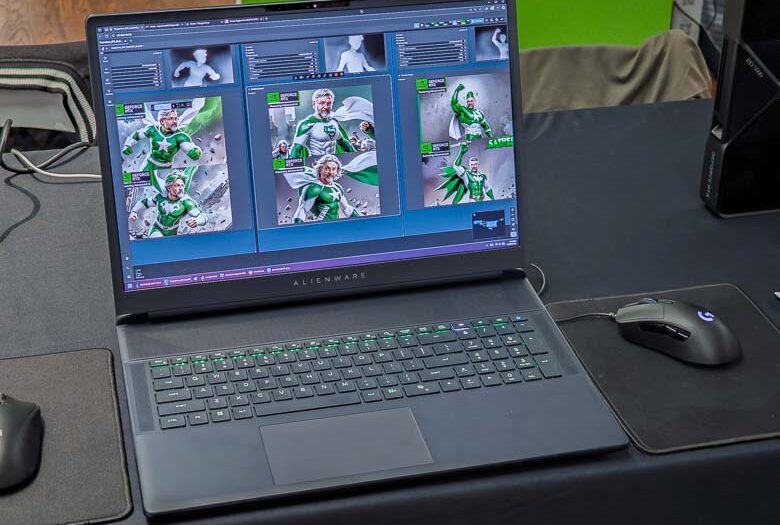
We got to see a demonstration of a cool ComfyUI template that NVIDIA created to showcase how quickly their RTX 5090 GPU can process image generation locally on a laptop computer. Most people think we need a high-end server farm in the cloud to do all of these new “Artificial Intelligence” imagery, video, and text generation, but there are numerous smaller models that can actually run locally and can run pretty nicely if you have the proper hardware.

ComfyUI is a node-based interface for creating workflows that interact with various AI models. The latest version gets a performance boost with NVIDIA’s RTX GPUs as well.
NVIDIA’s demo ComfyUI template was set up to take a picture from the web cam, recognize the person in the photo, then use a Stable Diffusion model to create a variety of fictional super hero images and poses of that person. In addition, the template was programmed to add NVIDIA logos to the corner and also use colors that coordinate with NVIDIA’s branding.
Generating 6 AI images only took seconds with the amazing NVIDIA RTX 5090 mobile GPU!
I love ComfyUI though it certainly does have a bit of a learning curve and works best with some expensive hardware, but running generative AI models locally can be a lot less expensive and privacy friendly than running them through a cloud subscription service.
The speed of local generation on that RTX 5090 is wild, but for lighter tweaks I stick to an online AI photo editor like the one I’ve been using. It’s nice not having to juggle hardware just to remove objects or do a quick cartoon style. online AI photo editor
It’s genuinely impressive that the RTX 5090 mobile GPU can generate six Stable Diffusion images in just seconds on a laptop. The webcam-to-superhero ComfyUI demo is a fun way to show what local inference can do without touching the cloud. I’m curious how the thermals hold up during longer generation sessions, though.